Start with your fleet. Follow the session. Give your drivers results worth coming back for.
// ACE MANAGERSERVER CARDS / v0.199.75
The next session, at a glance.
Public server cards with tracks, sessions, car classes and join controls. Captured from ACE.SimRacers.online on 4 October 2026.
02 / FROM FIRST PRACTICE TO FINAL RESULT
A race night has a lot of parts. Bring them together.
01 / MANAGE
One server or a whole fleet.
Choose tracks, cars, weather and sessions. Start and stop servers, reuse your settings and see when something needs attention.
Cards and compact fleet views
Server health and stop reasons
Copy configurations between servers
02 / RACE
Stay on top of the session.
Race Control puts drivers, the grid, penalties, chat and the console in one place, alongside the circuit map.
Live timing and circuit maps
Driver and grid controls
Ballast and restrictor settings
03 / ORGANISE
Give the grid something to chase.
Build championships, run Time Attack challenges and organise duels. Results become standings without a separate spreadsheet.
Classes, teams and points
Sign-ups and scheduled events
Success ballast from standings
04 / UNDERSTAND
There’s more to a lap than a time.
Explore lap times, gaps, sector performance and consistency. See where the pace came from and where time was lost.
Four telemetry views
Driver profiles and records
Rating, safety rating and licences
05 / CONNECT
Keep your community in the loop.
Share race announcements and results through Discord. Connect to the Portal Hub so drivers can discover more racing.
Announcements and live status boards
Cross-community events and rankings
ACE Passport with links to community websites
Scheduled server messages and personalised welcome messages
06 / MAKE IT YOURS
Your community should feel like yours.
Customise the public racing page, manage car and converted track mods, and connect your own scripts through the API. EVO-compatible mods made with EvoForge are supported too.
Community colours applied before the page appears
Hide navigation, the flag ribbon and join controls
Themes, hero text and background images
Car packages and converted track ZIP uploads
API keys with scoped permissions
More of the things that make a race night easier +
Weather & race nights
Use circuit weather and local time, or let drivers vote for the next combination.
Backups & updates
Keep automatic backups and update from the panel with verified downloads and restart progress. Reset statistics while keeping SR/ELO, reset ratings while keeping results, or clear racing data while retaining your settings.
Privacy & control
Manage access, publish a privacy notice and give drivers control over their network participation.
Results from elsewhere
Import result files from servers outside your own fleet and bring them into your community’s records.
ONE COMMUNITY. A WORLD OF RACING.
Independent grids. Connected by racing.
Your home community. Your connection to everyone else.
The SimRacers network connects communities running ACE Manager. Discover races, compare results and keep your driver identity across the network.
Run ACE Manager on your server machine. Manage it from your browser.
01
Get the essentials.
Install a supported Node.js LTS release and the Assetto Corsa EVO dedicated server from Steam. On Linux, the game server also needs Wine.
02
Unpack & launch.
Extract the Manager download into its own folder. Start it using the launcher for your platform.
Windows: start.bat
Linux: ./start.sh
03
Make it your grid.
Open the panel at the address shown by the launcher. Set your password, choose your server location and configure your first session.
The included installation guide covers setup and game-server ports. Connecting to the Portal Hub uses outbound connections; hosting a game server still needs the appropriate network ports.
Compare your downloaded file with the SHA-256 checksum published in the release manifest.
Show verification commands
Windows PowerShell
Linux
04 / STILL BUILDING. STILL RACING.
Made better. Lap after lap.
We use ACE Manager ourselves. Changes come from real race nights and community feedback.
v0.199.75
Your page. Your colours.
Choose community colours without a turquoise flash at startup. Control the visibility of navigation, the flag ribbon and server join buttons.
RESULTS & PASSPORT
More context. Fewer clicks.
Ten recent results in driver cards, direct session links, top-six race cards and published community website links in ACE Passport.
QUICK JOIN v0.8.7
Discover your next grid.
Browse servers and the ACE Manager network, find championships and Time Attacks, explore player statistics and recognise Manager servers by their AM badge.
These are selected changes. The download’s release notes contain the full history.
Recent release history · Manager & Quick Join +
Updated 4 October 2026. Selected changes from the published release notes; full notes are included in each download.
Manager v0.199.75
Colours, layout and racing data controls
Community colours before first paint; independent navigation, ribbon and join-button visibility; separate statistics and SR/ELO resets. Driver cards show ten recent results with session links, Passport includes community website links, and race cards show up to six finishers.
Quick Join v0.8.7
Recognise ACE Manager servers
A clear AM badge with improved contrast and selected-row visibility in All Servers and Network Servers.
Manager v0.199.74
Clearer Tourist live timing
Pit-exit messages update driver status correctly. A whole Tourist run is no longer displayed as sector 2 when intermediate splits are unavailable. Circuit-map movement remains an estimate from lap times.
Manager v0.199.73
Driver presence without statistics
Driver counts, car identity and session status remain visible when statistics collection is disabled. Configured join greetings can still welcome those drivers.
Manager v0.199.72
Lap announcements in game chat
Readable TRACK RECORD and FASTEST LAP messages from confirmed session results, with an optional all-time-record-only filter and separate game-chat setting.
Manager v0.199.71
Race Control across your fleet
Shared connection identity, automatic selection from allowed cars and clearer configuration errors. Saved ballast and restrictor values appear under driver names and apply at the next server start.
Manager v0.199.70
Independent server-card heights
Opening one join menu no longer stretches neighbouring fleet cards. Championship and Time Attack result-export fixes are retained.
CONNECTED COMMUNITIES. SHARED PROGRESS.
A network. Growing together.
Every driver, every session, every lap adds to the story. Explore how the connected ACE Manager network has grown over time.
Network growth
DAILY HISTORY · PORTAL HUB
Choose a metric to explore its history. Changes below each total compare the last 7 and 30 days.
One companion for servers, communities and your next race.
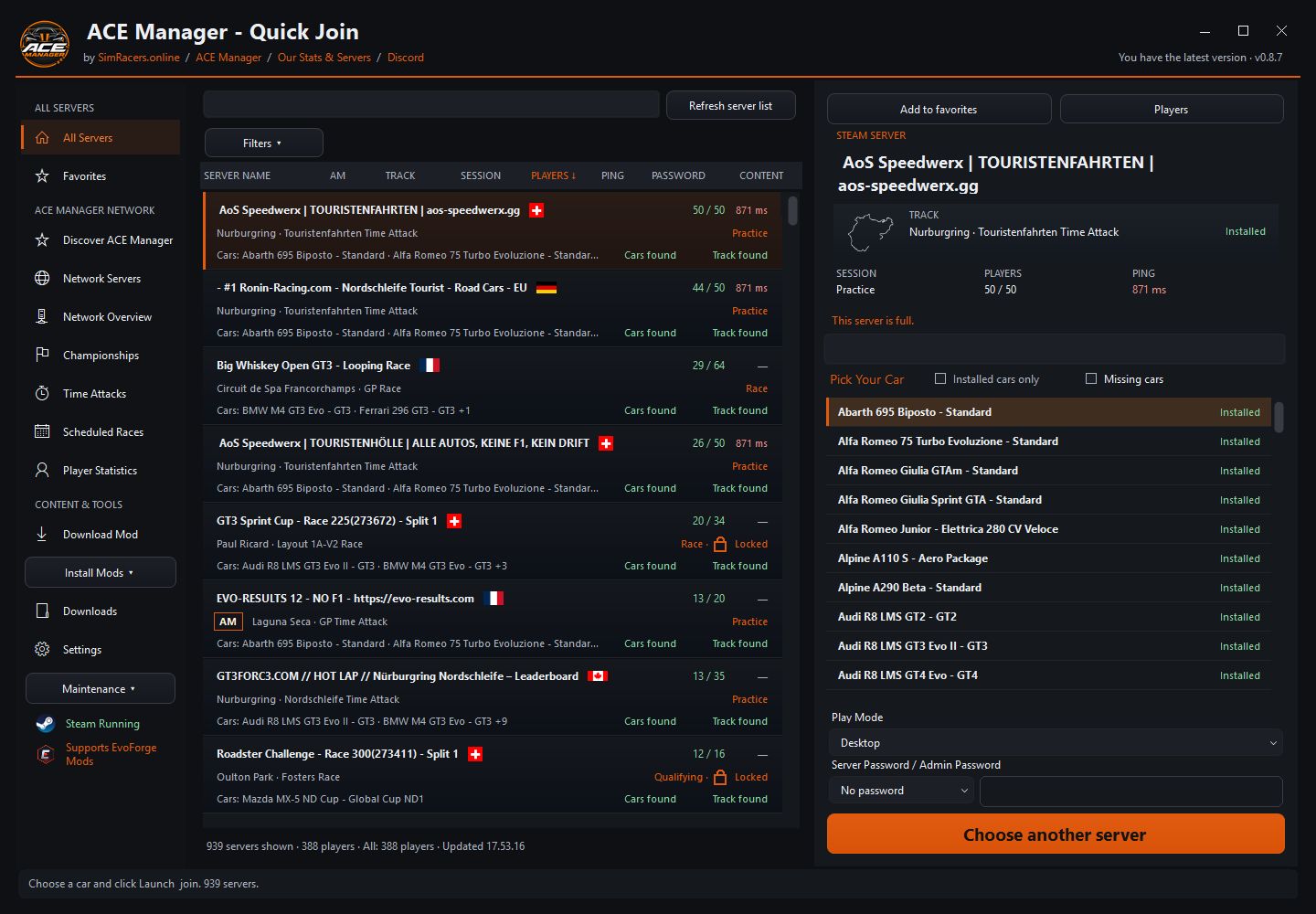
Search EVO servers, choose a car and launch in desktop or VR mode. Shared Manager links open the matching server, while content checks help you see what is installed before joining.
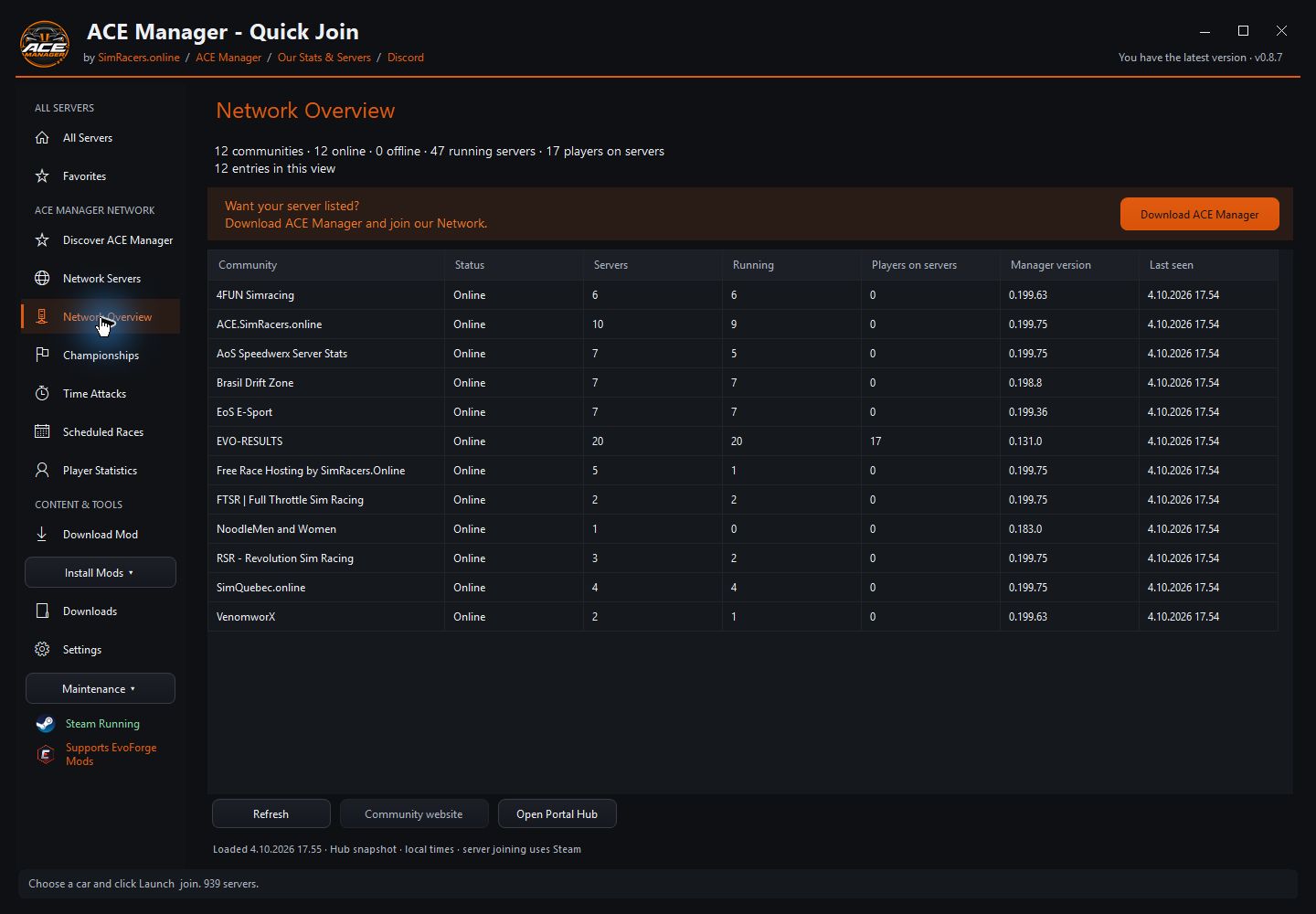
All Servers, car selection and content checks · v0.8.7 · 4 October 2026Network Overview · Connected communities and server status · 4 October 2026
All Servers, favourites and Network Servers with recognisable AM badges
Network Overview, championships, Time Attacks and scheduled races
Player statistics and community website links
Installed car and track checks, mod ZIP installation and download management
Desktop and VR launch options with shared server links
Windows x64 · .NET Framework 4.8 · Steam and Assetto Corsa EVO required. Open Steam before launching. The game verifies content compatibility when you join. Screenshots show the available servers at capture time.
 ACE Manager